More than a Route: Creating a Digital Climbing Community
Building a Supportive, Accessible, and Inspiring Community for Climbers of All Levels
Timeline
Fourteen Days
Audience
Outdoor Climbers
Boulders
Outdoor Adventurers
REI Customers
Overview
Time Frame- 15 Days
Project Challenge:
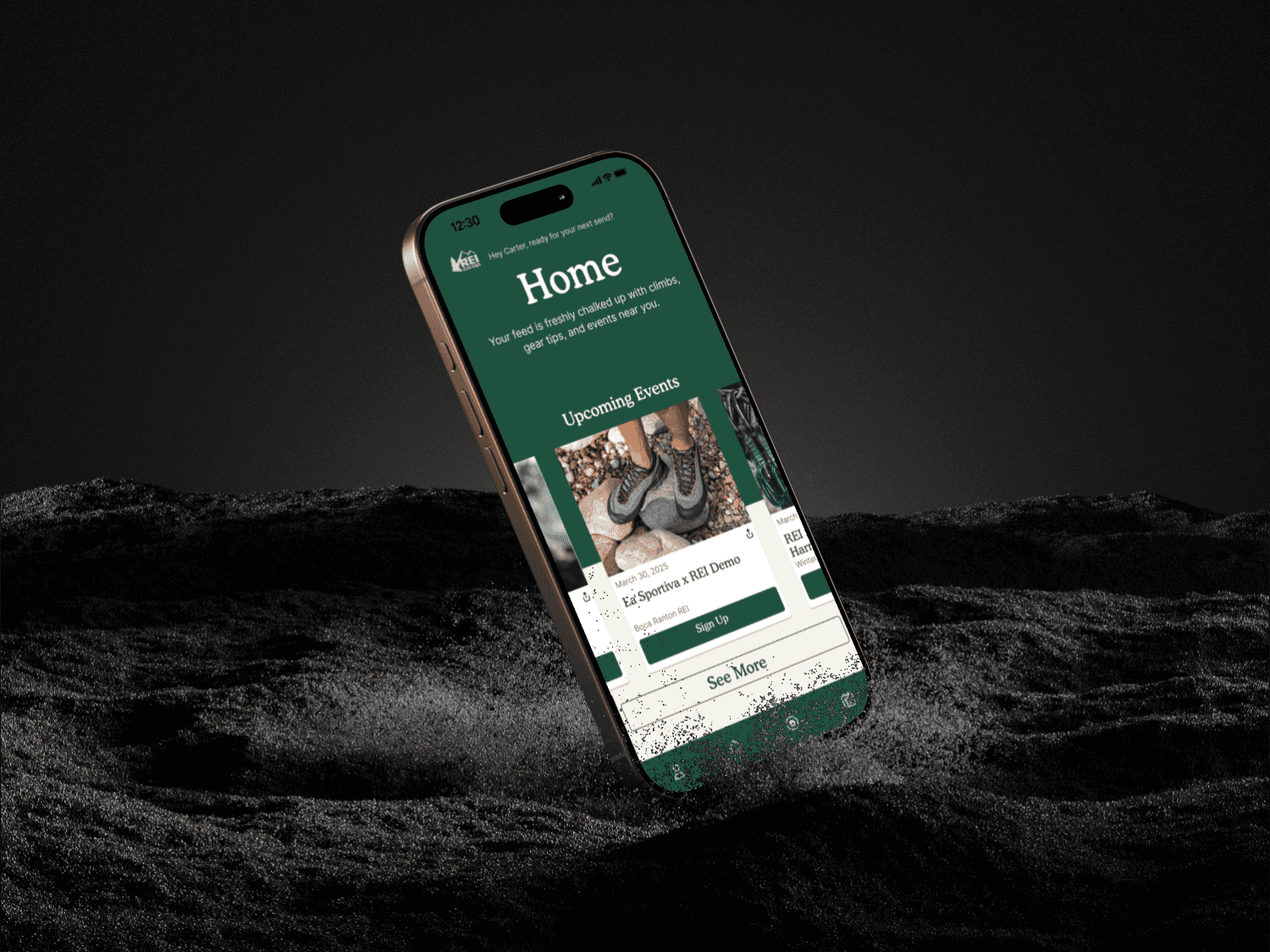
REI wants to be the #1 brand in the eyes of climbers. They plan to create an experience specifically for climbers, providing useful information every single day, regardless of whether the climber is climbing or not. They want to create an accessible and friendly platform for climbers to stay informed.
Project Summary
View Project
View Project
UX Research- User Interviews, Business Model Mapping, Competitor Analysis, Feature Inventory,
Design - User Persona,
Rapid Prototyping and Wireframing- Usability Refinement
Testing- Conceptual and High-fidelity testing rounds
Collaborative Workflows- Design Studios, iterative wireframing, hybrid work flows (a mix of Agile and Waterfall sprints)
Methodologies
Objectives
Develop tools and features that encourage connection and collaboration, allowing climbers to find, join, and create local or virtual climbing groups, events, and challenges.
Design a welcoming, easy-to-use platform with inclusive features that cater to climbers of all experience levels, backgrounds, and abilities.
Offer resources and content that motivate climbers to improve their skills, try new climbing styles, and stay informed about climbing news and trends.
Challenges
Climber First:
Climbers can access essential safety information, monitor their development with tailored goals, and connect with others through social features that encourage sharing achievements and learning from one another.
On & Offline Friendly:
Event participation is made easy both online and offline with downloadable schedules, maps, and information. .
Seamless Commerce:
Climbers can unlock exclusive discounts by participating in events, completing challenges, or engaging with educational content, ensuring that each interaction with the app brings tangible value in the form of discounts and offers on climbing gear.
Brand Identity
REI's mission is to continue to inspire, educate, and outfit for a lifetime of outdoor and stewardship.
Through this project, we used a mix of strong branding, integration, and community to create something that fits closely with REI's mission
Outcomes
In the low-fi usability test, users often struggled to complete core tasks because navigation patterns and icon meanings were unclear, resulting in multiple drop-offs. By the time we reached the high-fi test, improvements in layout and interaction design allowed users to complete every assigned task successfully.
100% Task Success Rate
With a 25% improvement from Low-fi
Feedback in the low-fi test revealed user frustration, especially when trying to locate events or interpret unclear terminology. In contrast, high-fi participants shifted their focus from “why doesn’t this work?” to providing thoughtful suggestions about improving visuals, onboarding, and trust signals.
70% increase- User Sentiment
Positive feedback increased by 70%
Low-fi testing revealed frequent usability errorssuch as misclicks on icons that didn’t communicate their purpose and failed attempts to find events due to vague labels. By high-fi, these issues had been addressed, and mistakes were reduced to minor copy or wording clarifications rather than navigation failures.
80% Reduction in Errors
With minor copy-related errors
How Might We create a community platform where climbers can connect, share experiences, and support each other?
What We Learned
Throughout the project, we discovered that climbers are motivated not only by personal progress but also by connection with others. This taught us to never assume what the users might need, and to always design for the users and not for ourselves
Designing for Community Builds Engagement
While early testing surfaced functional issues, later rounds revealed the importance of onboarding clarity, consistent copy, and credibility signals. Users wanted clear terminology, product transparency, and trusted reviews. This highlighted that in UX, functionality gets users in the door, but trust and clarity keep them there.
Clarity and Trust Are as Crucial as Functionality
Early pain points around navigation, copy, and event discovery were identified and resolved, leading to measurable improvements: faster task completion, fewer errors, and 100% task success. This experience reinforced that usability testing is not a checkbox, but an ongoing process that shapes product maturity.
Iterative Testing Transforms Usability
Discover
User Insights
"The community one is really important, I don't want to cold turkey and start climbing without knowing anyone there"
"I want the best quality equipment to keep me performing at the top of my sport, but within my budget."
“It can feel intimidating and dangerous to climb outdoor routes without proper coaching and gears”
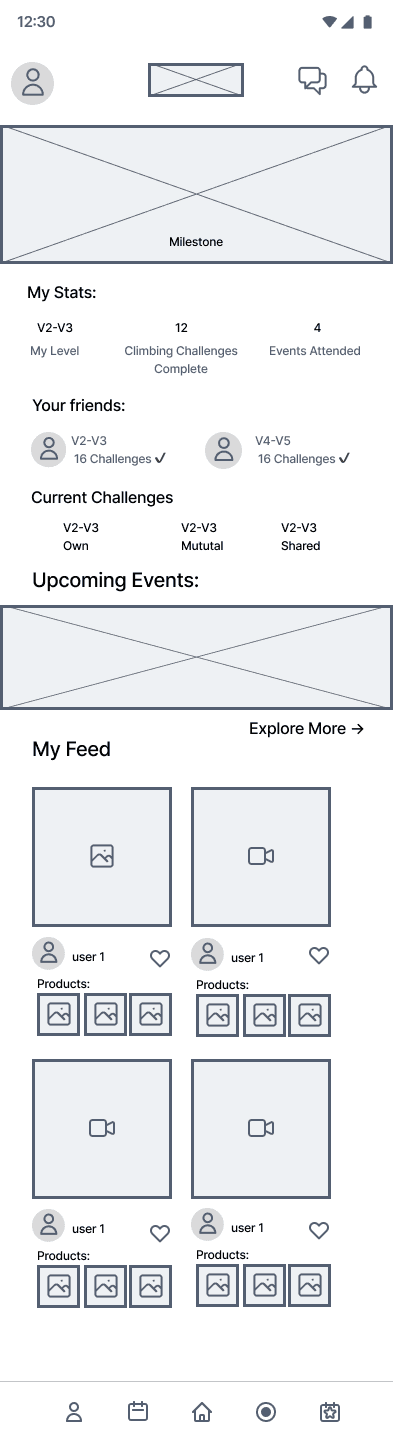
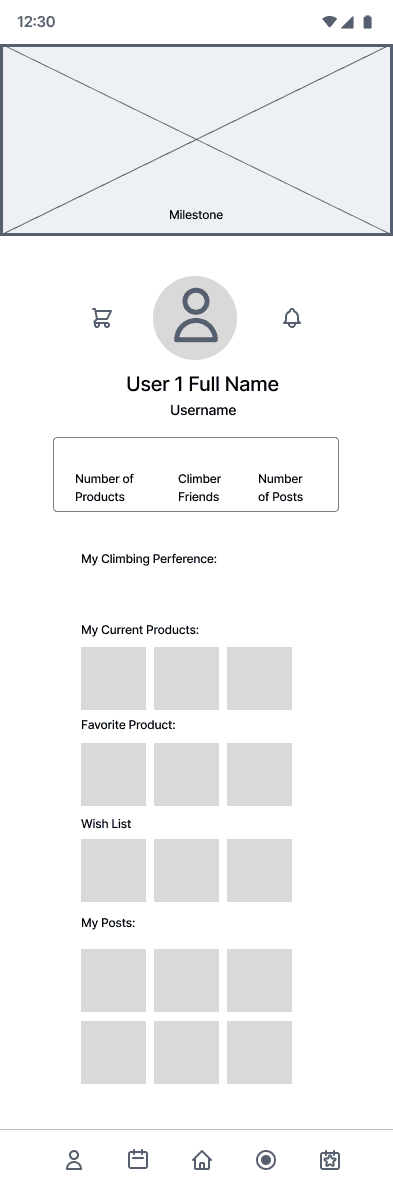
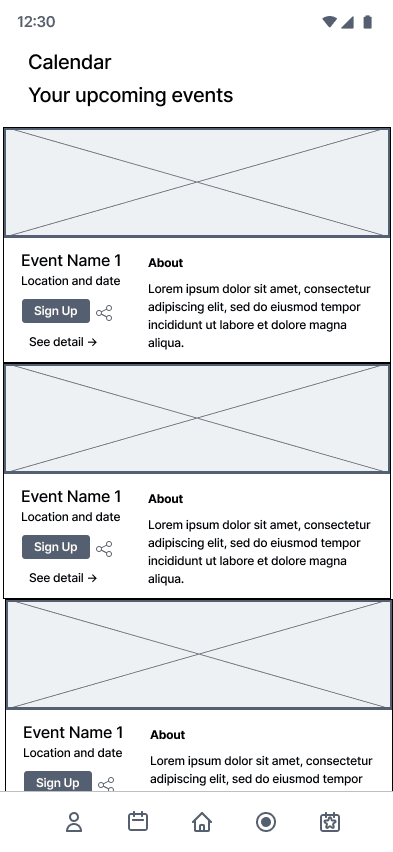
Mid-fi Wireframes
Ideation and Design
Feature Prioritization
Event Booking
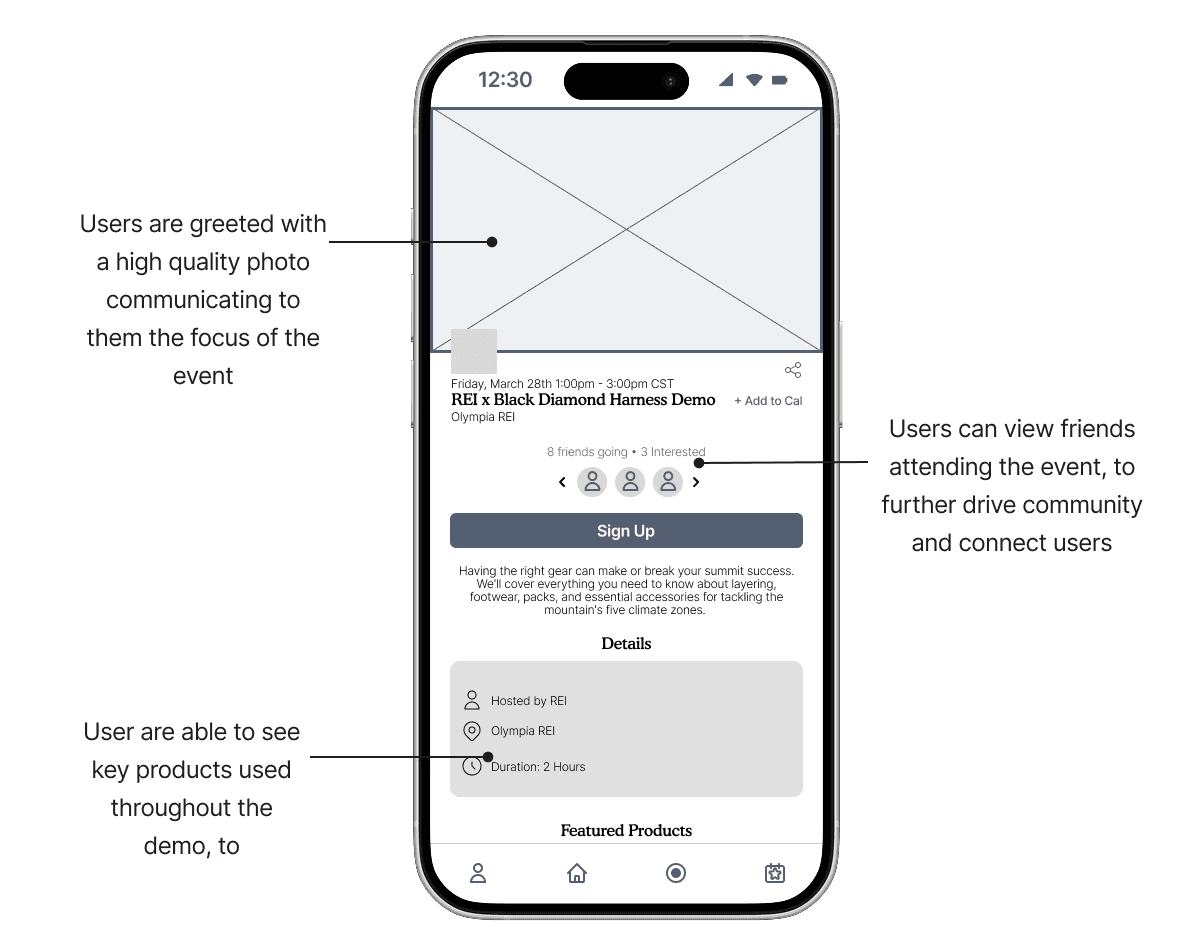
Throughout our user interviews, we found one thing to be clear: the climbing community is one of the strongest motivators for our users. We found that allowing users to attend and demo products at in-person events enables continuous learning while fostering a community by providing an opportunity for users to attend with friends.
Core Feedback
Users wanted explanations of terminology (e.g., climbing jargon) to ensure accessibility.
Onboarding and Clarity
Comments leaned toward visual polish, not core functionality, a positive indicator that fundamentals were solid.
UI Improvements
Users wanted the tone to be fine-tuned and messaging made more clear to make instructions more intuitive
Copy and Imagery
Testing
Conclusion
Like What You See?
Lets Connect!
More than a Route: Creating a Digital Climbing Community
Building a Supportive, Accessible, and Inspiring Community for Climbers of All Levels
Client
REI (Concept Project)
Roles
Project Lead, Design Lead
Tools
Figma/Figjam, Dovetail, Notion, Google Forms
Timeline
Fourteen Days
Audience
Outdoor Climbers
Boulders
Outdoor Adventurers
REI Customers
Overview
Time Frame- 15 Days
Project Challenge:
REI wants to be the #1 brand in the eyes of climbers. They plan to create an experience specifically for climbers, providing useful information every single day, regardless of whether the climber is climbing or not. They want to create an accessible and friendly platform for climbers to stay informed.
Project Summary
View Project
Methodologies
View Project
Objectives
Develop tools and features that encourage connection and collaboration, allowing climbers to find, join, and create local or virtual climbing groups, events, and challenges.
Offer resources and content that motivate climbers to improve their skills, try new climbing styles, and stay informed about climbing news and trends.
Design a welcoming, easy-to-use platform with inclusive features that cater to climbers of all experience levels, backgrounds, and abilities.
Challenges
Climber First:
Climbers can access essential safety information, monitor their development with tailored goals, and connect with others through social features that encourage sharing achievements and learning from one another.
Seamless Commerce:
Climbers can unlock exclusive discounts by participating in events, completing challenges, or engaging with educational content, ensuring that each interaction with the app brings tangible value in the form of discounts and offers on climbing gear.
On & Offline Friendly:
Event participation is made easy both online and offline with downloadable schedules, maps, and information. .
UX Research- User Interviews, Business Model Mapping, Competitor Analysis, Feature Inventory,
Design - User Persona,
Rapid Prototyping and Wireframing- Usability Refinement
Testing- Conceptual and High-fidelity testing rounds
Collaborative Workflows- Design Studios, iterative wireframing, hybrid work flows (a mix of Agile and Waterfall sprints)
Brand Identity
REI's mission is to continue to inspire, educate, and outfit for a lifetime of outdoor and stewardship.
Through this project, we used a mix of strong branding, integration, and community to create something that fits closely with REI's mission
Outcomes
In the low-fi usability test, users often struggled to complete core tasks because navigation patterns and icon meanings were unclear, resulting in multiple drop-offs. By the time we reached the high-fi test, improvements in layout and interaction design allowed users to complete every assigned task successfully.
100% Task Success Rate
With a 25% improvement from Low-fi
Low-fi testing revealed frequent usability errorssuch as misclicks on icons that didn’t communicate their purpose and failed attempts to find events due to vague labels. By high-fi, these issues had been addressed, and mistakes were reduced to minor copy or wording clarifications rather than navigation failures.
80% Reduction in Errors
With minor copy-related errors
Feedback in the low-fi test revealed user frustration, especially when trying to locate events or interpret unclear terminology. In contrast, high-fi participants shifted their focus from “why doesn’t this work?” to providing thoughtful suggestions about improving visuals, onboarding, and trust signals.
70% increase- User Sentiment
Positive feedback increased by 70%
How Might We create a community platform where climbers can connect, share experiences, and support each other?
User Insights
"The community one is really important, I don't want to cold turkey and start climbing without knowing anyone there"
“It can feel intimidating and dangerous to climb outdoor routes without proper coaching and gears”
"I want the best quality equipment to keep me performing at the top of my sport, but within my budget."
Discover
Mid-fi Wireframes
Ideation and Design
Feature Prioritization
Event Booking
Throughout our user interviews, we found one thing to be clear: the climbing community is one of the strongest motivators for our users. We found that allowing users to attend and demo products at in-person events enables continuous learning while fostering a community by providing an opportunity for users to attend with friends.
Core Feedback
Users wanted explanations of terminology (e.g., climbing jargon) to ensure accessibility.
Onboarding and Clarity
Users wanted the tone to be fine-tuned and messaging made more clear to make instructions more intuitive
Copy and Imagery
Comments leaned toward visual polish, not core functionality, a positive indicator that fundamentals were solid.
UI Improvements
Testing
What We Learned
Throughout the project, we discovered that climbers are motivated not only by personal progress but also by connection with others. This taught us to never assume what the users might need, and to always design for the users and not for ourselves
Designing for Community Builds Engagement
Early pain points around navigation, copy, and event discovery were identified and resolved, leading to measurable improvements: faster task completion, fewer errors, and 100% task success. This experience reinforced that usability testing is not a checkbox, but an ongoing process that shapes product maturity.
Iterative Testing Transforms Usability
While early testing surfaced functional issues, later rounds revealed the importance of onboarding clarity, consistent copy, and credibility signals. Users wanted clear terminology, product transparency, and trusted reviews. This highlighted that in UX, functionality gets users in the door, but trust and clarity keep them there.
Clarity and Trust Are as Crucial as Functionality
Conclusion
More than a Route: Creating a Digital Climbing Community
Building a Supportive, Accessible, and Inspiring Community for Climbers of All Levels
Client
REI (Concept Project)
Roles
Project Lead, Design Lead
Tools
Figma/Figjam, Dovetail, Notion, Google Forms
Timeline
Fourteen Days
Audience
Outdoor Climbers
Boulders
Outdoor Adventurers
REI Customers
Overview
Time Frame- 15 Days
Project Challenge:
REI wants to be the #1 brand in the eyes of climbers. They plan to create an experience specifically for climbers, providing useful information every single day, regardless of whether the climber is climbing or not. They want to create an accessible and friendly platform for climbers to stay informed.
Project Summary
UX Research- User Interviews, Business Model Mapping, Competitor Analysis, Feature Inventory,
Design - User Persona,
Rapid Prototyping and Wireframing- Usability Refinement
Testing- Conceptual and High-fidelity testing rounds
Collaborative Workflows- Design Studios, iterative wireframing, hybrid work flows (a mix of Agile and Waterfall sprints)
How Might We create a community platform where climbers can connect, share experiences, and support each other?
Objectives
Develop tools and features that encourage connection and collaboration, allowing climbers to find, join, and create local or virtual climbing groups, events, and challenges.
Design a welcoming, easy-to-use platform with inclusive features that cater to climbers of all experience levels, backgrounds, and abilities.
Offer resources and content that motivate climbers to improve their skills, try new climbing styles, and stay informed about climbing news and trends.
Challenges
Climber First:
Climbers can access essential safety information, monitor their development with tailored goals, and connect with others through social features that encourage sharing achievements and learning from one another.
Seamless Commerce:
Climbers can unlock exclusive discounts by participating in events, completing challenges, or engaging with educational content, ensuring that each interaction with the app brings tangible value in the form of discounts and offers on climbing gear.
On & Offline Friendly:
Event participation is made easy both online and offline with downloadable schedules, maps, and information. .
Brand Identity
Outcomes
In the low-fi usability test, users often struggled to complete core tasks because navigation patterns and icon meanings were unclear, resulting in multiple drop-offs. By the time we reached the high-fi test, improvements in layout and interaction design allowed users to complete every assigned task successfully.
100% Task Success Rate
With a 25% improvement from Low-fi
Low-fi testing revealed frequent usability errorssuch as misclicks on icons that didn’t communicate their purpose and failed attempts to find events due to vague labels. By high-fi, these issues had been addressed, and mistakes were reduced to minor copy or wording clarifications rather than navigation failures.
80% Reduction in Errors
With minor copy-related errors
Feedback in the low-fi test revealed user frustration, especially when trying to locate events or interpret unclear terminology. In contrast, high-fi participants shifted their focus from “why doesn’t this work?” to providing thoughtful suggestions about improving visuals, onboarding, and trust signals.
70% increase- User Sentiment
Positive feedback increased by 70%
REI's mission is to continue to inspire, educate, and outfit for a lifetime of outdoor and stewardship.
Through this project, we used a mix of strong branding, integration, and community to create something that fits closely with REI's mission
Methodologies
What We Learned
Throughout the project, we discovered that climbers are motivated not only by personal progress but also by connection with others. This taught us to never assume what the users might need, and to always design for the users and not for ourselves
Designing for Community Builds Engagement
Early pain points around navigation, copy, and event discovery were identified and resolved, leading to measurable improvements: faster task completion, fewer errors, and 100% task success. This experience reinforced that usability testing is not a checkbox, but an ongoing process that shapes product maturity.
Iterative Testing Transforms Usability
While early testing surfaced functional issues, later rounds revealed the importance of onboarding clarity, consistent copy, and credibility signals. Users wanted clear terminology, product transparency, and trusted reviews. This highlighted that in UX, functionality gets users in the door, but trust and clarity keep them there.
Clarity and Trust Are as Crucial as Functionality
User Insights
"The community one is really important, I don't want to cold turkey and start climbing without knowing anyone there"
“It can feel intimidating and dangerous to climb outdoor routes without proper coaching and gears”
"I want the best quality equipment to keep me performing at the top of my sport, but within my budget."
Core Feedback
Users wanted explanations of terminology (e.g., climbing jargon) to ensure accessibility.
Onboarding and Clarity
Users wanted the tone to be fine-tuned and messaging made more clear to make instructions more intuitive
Copy and Imagery
Comments leaned toward visual polish, not core functionality, a positive indicator that fundamentals were solid.
UI Improvements
Mid-fi Wireframes
Feature Prioritization
Ideation and Design
Testing and Recommendations
Conclusion
Discover
Event Booking
Throughout our user interviews, we found one thing to be clear: the climbing community is one of the strongest motivators for our users. We found that allowing users to attend and demo products at in-person events enables continuous learning while fostering a community by providing an opportunity for users to attend with friends.
More than a Route: Creating a Digital Climbing Community
Building a Supportive, Accessible, and Inspiring Community for Climbers of All Levels
Client
REI (Concept Project)
Roles
Project Lead, Design Lead
Tools
Figma/Figjam, Dovetail, Notion, Google Forms
Timeline
Fourteen Days
Audience
Outdoor Climbers
Boulders
Outdoor Adventurers
REI Customers
Overview
Time Frame- 15 Days
Project Challenge:
REI wants to be the #1 brand in the eyes of climbers. They plan to create an experience specifically for climbers, providing useful information every single day, regardless of whether the climber is climbing or not. They want to create an accessible and friendly platform for climbers to stay informed.
Project Summary
View Project
UX Research- User Interviews, Business Model Mapping, Competitor Analysis, Feature Inventory,
Design - User Persona,
Rapid Prototyping and Wireframing- Usability Refinement
Testing- Conceptual and High-fidelity testing rounds
Collaborative Workflows- Design Studios, iterative wireframing, hybrid work flows (a mix of Agile and Waterfall sprints)
How Might We create a community platform where climbers can connect, share experiences, and support each other?
Objectives
Develop tools and features that encourage connection and collaboration, allowing climbers to find, join, and create local or virtual climbing groups, events, and challenges.
Design a welcoming, easy-to-use platform with inclusive features that cater to climbers of all experience levels, backgrounds, and abilities.
Offer resources and content that motivate climbers to improve their skills, try new climbing styles, and stay informed about climbing news and trends.
Challenges
Climber First:
Climbers can access essential safety information, monitor their development with tailored goals, and connect with others through social features that encourage sharing achievements and learning from one another.
Seamless Commerce:
Climbers can unlock exclusive discounts by participating in events, completing challenges, or engaging with educational content, ensuring that each interaction with the app brings tangible value in the form of discounts and offers on climbing gear.
On & Offline Friendly:
Event participation is made easy both online and offline with downloadable schedules, maps, and information. .
Brand Identity
Outcomes
In the low-fi usability test, users often struggled to complete core tasks because navigation patterns and icon meanings were unclear, resulting in multiple drop-offs. By the time we reached the high-fi test, improvements in layout and interaction design allowed users to complete every assigned task successfully.
100% Task Success Rate
With a 25% improvement from Low-fi
Low-fi testing revealed frequent usability errorssuch as misclicks on icons that didn’t communicate their purpose and failed attempts to find events due to vague labels. By high-fi, these issues had been addressed, and mistakes were reduced to minor copy or wording clarifications rather than navigation failures.
80% Reduction in Errors
With minor copy-related errors
Feedback in the low-fi test revealed user frustration, especially when trying to locate events or interpret unclear terminology. In contrast, high-fi participants shifted their focus from “why doesn’t this work?” to providing thoughtful suggestions about improving visuals, onboarding, and trust signals.
70% increase- User Sentiment
Positive feedback increased by 70%
REI's mission is to continue to inspire, educate, and outfit for a lifetime of outdoor and stewardship.
Through this project, we used a mix of strong branding, integration, and community to create something that fits closely with REI's mission
Methodologies
What We Learned
Throughout the project, we discovered that climbers are motivated not only by personal progress but also by connection with others. This taught us to never assume what the users might need, and to always design for the users and not for ourselves
Designing for Community Builds Engagement
Early pain points around navigation, copy, and event discovery were identified and resolved, leading to measurable improvements: faster task completion, fewer errors, and 100% task success. This experience reinforced that usability testing is not a checkbox, but an ongoing process that shapes product maturity.
Iterative Testing Transforms Usability
While early testing surfaced functional issues, later rounds revealed the importance of onboarding clarity, consistent copy, and credibility signals. Users wanted clear terminology, product transparency, and trusted reviews. This highlighted that in UX, functionality gets users in the door, but trust and clarity keep them there.
Clarity and Trust Are as Crucial as Functionality
User Insights
"The community one is really important, I don't want to cold turkey and start climbing without knowing anyone there"
“It can feel intimidating and dangerous to climb outdoor routes without proper coaching and gears”
"I want the best quality equipment to keep me performing at the top of my sport, but within my budget."
Core Feedback
Users wanted explanations of terminology (e.g., climbing jargon) to ensure accessibility.
Onboarding and Clarity
Users wanted the tone to be fine-tuned and messaging made more clear to make instructions more intuitive
Copy and Imagery
Comments leaned toward visual polish, not core functionality, a positive indicator that fundamentals were solid.
UI Improvements
Mid-fi Wireframes
Feature Prioritization
Ideation and Design
Testing and Recommendations
Conclusion
Discover
Event Booking
Throughout our user interviews, we found one thing to be clear: the climbing community is one of the strongest motivators for our users. We found that allowing users to attend and demo products at in-person events enables continuous learning while fostering a community by providing an opportunity for users to attend with friends.
Like What You See?
Lets Connect!